
Stream Live — notifications for live streams by Kunzhutina
Follow your favorite broadcasts on all popular platforms
155 Users155 Users
Extension Metadata
Screenshots


About this extension
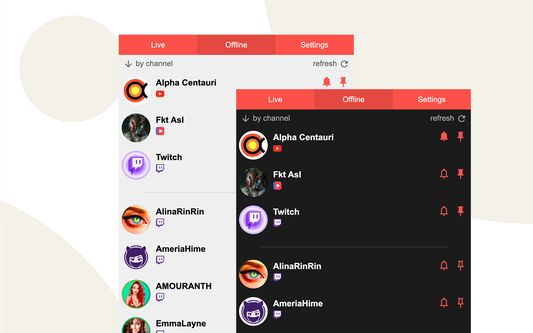
Stream Live helps you track live streams from supported services in one browser extension. See who is online, open streams in one click, and get Chrome desktop notifications when selected channels go live.
Built for viewers who follow Twitch streamers, YouTube live channels and creators from other streaming platforms without checking every site manually.
Key features:
- Live and offline channel lists in one popup
- Browser notifications when selected channels start streaming
- Pins for favorite channels and quick access
- Badge counter for live streams on the extension icon
- Light and dark themes
- Notification sound and display settings
- Twitch and Trovo sign-in where supported
- YouTube channel import and manual channel adding by URL
- Add Kick channels by URL and keep VK Video Live or Goodgame channels alongside the rest
- Import and export settings between devices
- Optional premium to support the project and raise channel limits
How to start:
1. Install Stream Live and pin it to the browser toolbar.
2. Sign in to a supported platform or add channels manually.
3. Choose which channels should be pinned or send notifications.
4. Open the popup or click a notification when a stream goes live.
Stream Live is an independent project and is not affiliated with any streaming platform.
Developed by fadme.dev
Built for viewers who follow Twitch streamers, YouTube live channels and creators from other streaming platforms without checking every site manually.
Key features:
- Live and offline channel lists in one popup
- Browser notifications when selected channels start streaming
- Pins for favorite channels and quick access
- Badge counter for live streams on the extension icon
- Light and dark themes
- Notification sound and display settings
- Twitch and Trovo sign-in where supported
- YouTube channel import and manual channel adding by URL
- Add Kick channels by URL and keep VK Video Live or Goodgame channels alongside the rest
- Import and export settings between devices
- Optional premium to support the project and raise channel limits
How to start:
1. Install Stream Live and pin it to the browser toolbar.
2. Sign in to a supported platform or add channels manually.
3. Choose which channels should be pinned or send notifications.
4. Open the popup or click a notification when a stream goes live.
Stream Live is an independent project and is not affiliated with any streaming platform.
Developed by fadme.dev
Rated 4.8 by 10 reviewers
Permissions and data
Required permissions:
- Display notifications to you
- Access your data for streamlive.fadme.dev
- Access your data for www.twitch.tv
- Access your data for www.youtube.com
- Access your data for trovo.live
- Access your data for live.vkvideo.ru
- Access your data for goodgame.ru
- Access your data for kick.com
Optional permissions:
- Access your data for sites in the ggpht.com domain
- Access your data for sites in the googleusercontent.com domain
- Access your data for static-cdn.jtvnw.net
- Access your data for headicon.trovo.live
- Access your data for images.vkplay.live
- Access your data for images.live.vkplay.ru
- Access your data for images.live.vkvideo.ru
- Access your data for files.kick.com
- Access your data for static.goodgame.ru
- Access your data for streamlive.fadme.dev
- Access your data for www.twitch.tv
- Access your data for www.youtube.com
- Access your data for trovo.live
- Access your data for live.vkvideo.ru
- Access your data for goodgame.ru
- Access your data for kick.com
More information
- Add-on Links
- Version
- 2.28.0
- Size
- 333.37 KB
- Last updated
- 3 months ago (Mar 27, 2026)
- Related Categories
- License
- Mozilla Public License 2.0
- Privacy Policy
- Read the privacy policy for this add-on
- Version History
- Add to collection